Saturday, October 27, 2012

Kanban Resources

http://limitedwipsociety.ning.com/

http://kanbanresources.com

4 easy steps: http://kanbantool.com/kanban-library/introduction
  1. Visualise your work
  2. Limit WIP
    1. 100% capacity = minimal throughput
    2. maintain flow, eliminate waste
  3. Don't push too hard (pull instead)
  4. Use it (then monitor, adapt, improve)
    1. CFD
    2. kanbantool.com
    3. Mix kanban with something you like (scrumban, pomodoroban
Kick-Start Example: http://www.crisp.se/file-uploads/kanban-example.pdf

Agile Academy Kanban

http://www.agileacademy.com.au/agile/sites/default/files/Kanban.pdf


  • Not timeboxed
  • Focussed on the flow of work, removing sources of variability  
  • Work is pulled from the back of the flow (rather than pushed from the front)
  • WIP == limits how much work can be in any one flow state at a point in time.
    • Encourages"swarming‟ around roadblocks to ensure removed ASAP
  • "Lead time‟ == Measurement of flow (instead of Velocity )
    • Cumulative Flow Diagrams and Variability Diagrams track progress (rather than Burn Up or Down charts)  
  • Work broken down to roughly similar size.  
  • Tracks flow of stories and associated "epic" ("minimum marketable feature") 
  • Embedded process for handling:
    • expedited items 
    • fixed delivery dates
    • work type splitting (e.g. enhancements, production defects, and text changes) 
  • Slack deliberately encouraged to allow for CI to process to be identified/actioned 
  • Prioritisation of backlog performed just in time


Thursday, October 25, 2012

Henry Kniberg: Cause and Effect & A3 Problem Solving

Cause & Effect Diagrams: www.crisp.se/henrik.kniberg/cause-effect-diagrams.pdf

  • Also Ishikawa Fishbone Diagram
  • Benefits:
    • Creates a common understanding - practical collaboration
    • Focuses on most important problems first
    • Helps turn vicious cycles into positive reinforcing loops (good stuff leading to more good stuff, instead of bad stuff leading to more bad stuff)
  • All problems are systemic - don't point fingers - the systems broken to allow this to happen
  • Until you find the source of the glitch, most attempts to fix the problem will be
    futile or even counterproductive.
  • Used as the root cause analysis of A3 problem solving (more below)
  • Basic process: 
  1. Select a problem – anything that’s bothering you - and write it down.
  2. Trace “upwards” to figure out the business consequences, the “visible damage” that your problem is causing. 
  3. Trace “downwards” to find the root cause (or causes).  
  4. Identify and highlight vicious cycles (circular paths) 
  5. Iterate the above steps a few times to refine and clarify your diagram 
  6. Decide which root causes to address and how (i.e. which countermeasures to implement)
  • Countermeasures are just experiments - prod the system to see how it will work
    • If they don't work, analyse, update diagram, try other countermeasures
    • Follow-up is important
  • Failure == system trying to tell you something, better listen
  • "Only real failure is failure to learn from failure"
  • Ask "so what" until get to problem(s) that conflicts with goal
    • Analyse consequences of problem:
      • Quantify: How much revenue/customers lost?
      • How do you know when you've solved problem?
  • Ask "why" until dig down towards the root
  • Vicious cycles: recurring problems usually involve re-inforcing loops
  • Spotting them increases likelihood of solving
  • Easy to miss important causes on first pass - go back and ask more "why"s
  • Label root causes, propose countermeasures
  • Root causes:
    • only have arrows going out
    • further whys don't feel meaningful
    • issues is something we can address with significant positive effect
  • It typically takes about 5 whys to get to the root
  • In between problems and root causes are symptoms
  • Without analysis, jump to conclusions & execute ineffective/counterproductive changes. 
    • E.g. adding more people, though head count had nothing to do with the problem. 
    • E.g. changing the incentive model (reward people for releasing on time or punish people for releasing late)
  • How to create
    • Alone: powerpoint/Visio
    • Small group: whiteboard with post-its, everybody helps
    • Large group (>8): split into groups, same problem, compare at end
  • Maintaining: Worth keeping in Visio/Powerpoint, replicating on whiteboard for updates, synchronising with soft copy
  • Pitfalls:
    • Too complex
      • Remove redundant boxes
      • Focus depth first, write one or two most important problems, dig deeper
      • Problem too broad? Limit to narrowly defined problem
      • Split diagram into pieces (point to stack of "etc" boxes)
    • Too simple
  • Never perfect: "all models are wrong but some are useful"


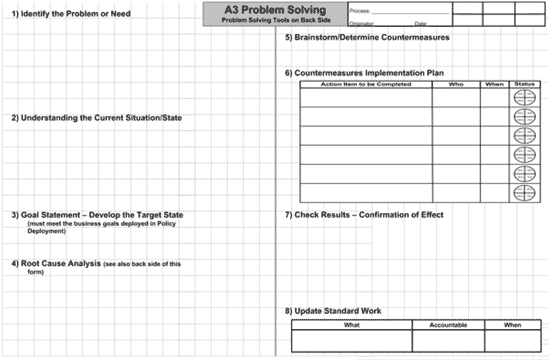
A3 Template: http://www.crisp.se/gratis-material-och-guider/a3-template  PDF, Word
  1. Identify the problem or need
  2. Understand the current situation/state
  3. Develop the goal statement – develop the target state
  4. Perform root cause analysis
  5. Brainstorm/determine countermeasures
  6. Create a countermeasures implementation plan
  7. Check results – confirm the effect
  8. Update standard work
These steps follow the Deming Plant-Do-Check-Act (PDCA) cycle, with steps 1 through 5 being the ”Plan”, Step 6 being the “Do”, Step 7 being the “Check” and Step 8 being the “Act”.
 On the A3 template, the steps are typically laid out like this:

Wednesday, October 24, 2012

Henri Kniberg Kanban Links & Comic


  • Know your goal
    • Hint: Agile/Lean/Kanban/Scrum isn’t it.
  • Never blame the tool
    • Tools don’t fail or succeed. People do.
    • There is no such thing as a good or bad tool. Only good or bad decisions about when, where, how, and why to use which tool.
  • Don’t limit yourself to one tool
    • Learn as many as possible.
    • Compare for understanding, not judgement.
  • Experiment & enjoy the ride
    • Don’t worry about getting it right from start; you won’t.
    • The only real failure is the failure to learn from failure.

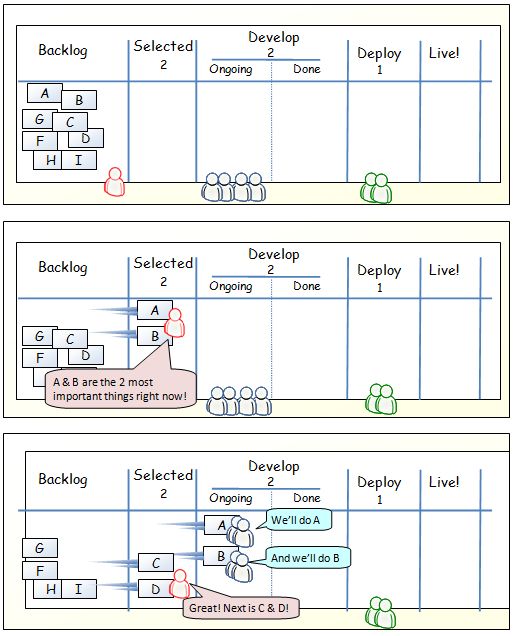
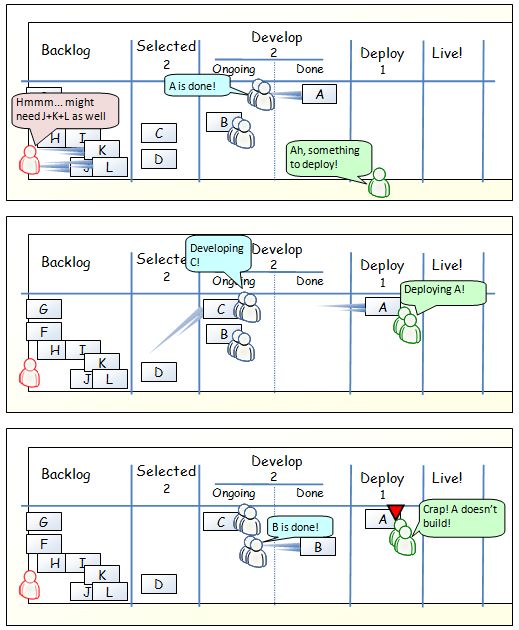
Comic Strip: http://blog.crisp.se/2009/06/26/henrikkniberg/1246053060000


"The change from 2 to 3 developer limit was mostly to show that it can change. In this case to accommodate a higher variability"

"To be for or against Kanban would be as silly as being for or against staplers. It’s all about context"


Sunday, October 21, 2012

HTTP Draft


HTTP/1.1: Semantics and Content
Application-level protocol for distributed, collaborative, hypertext information systems. 

Table of Contents
   5.  Request Methods . . . . . . . . . . . . . . . . . . . . . . .  22
       5.2.1.  Safe Methods  . . . . . . . . . . . . . . . . . . . .  24
       5.2.2.  Idempotent Methods  . . . . . . . . . . . . . . . . .  25
       5.2.3.  Cacheable Methods . . . . . . . . . . . . . . . . . .  25
     5.3.  Method Definitions  . . . . . . . . . . . . . . . . . . .  25
       5.3.1.  GET . . . . . . . . . . . . . . . . . . . . . . . . .  25
       5.3.2.  HEAD  . . . . . . . . . . . . . . . . . . . . . . . .  26
       5.3.3.  POST  . . . . . . . . . . . . . . . . . . . . . . . .  27
       5.3.4.  PUT . . . . . . . . . . . . . . . . . . . . . . . . .  28
       5.3.5.  DELETE  . . . . . . . . . . . . . . . . . . . . . . .  30
       5.3.6.  CONNECT . . . . . . . . . . . . . . . . . . . . . . .  30
       5.3.7.  OPTIONS . . . . . . . . . . . . . . . . . . . . . . .  32
       5.3.8.  TRACE . . . . . . . . . . . . . . . . . . . . . . . .  33
   7.  Response Status Codes . . . . . . . . . . . . . . . . . . . .  46
     7.2.  Informational 1xx . . . . . . . . . . . . . . . . . . . .  49
       7.2.1.  100 Continue  . . . . . . . . . . . . . . . . . . . .  49
       7.2.2.  101 Switching Protocols . . . . . . . . . . . . . . .  49
     7.3.  Successful 2xx  . . . . . . . . . . . . . . . . . . . . .  50
       7.3.1.  200 OK  . . . . . . . . . . . . . . . . . . . . . . .  50
       7.3.2.  201 Created . . . . . . . . . . . . . . . . . . . . .  50
       7.3.3.  202 Accepted  . . . . . . . . . . . . . . . . . . . .  51
       7.3.4.  203 Non-Authoritative Information . . . . . . . . . .  51
       7.3.5.  204 No Content  . . . . . . . . . . . . . . . . . . .  51
       7.3.6.  205 Reset Content . . . . . . . . . . . . . . . . . .  52
     7.4.  Redirection 3xx . . . . . . . . . . . . . . . . . . . . .  52
       7.4.1.  300 Multiple Choices  . . . . . . . . . . . . . . . .  54
       7.4.2.  301 Moved Permanently . . . . . . . . . . . . . . . .  54
       7.4.3.  302 Found . . . . . . . . . . . . . . . . . . . . . .  55
       7.4.4.  303 See Other . . . . . . . . . . . . . . . . . . . .  55
       7.4.5.  305 Use Proxy . . . . . . . . . . . . . . . . . . . .  56
       7.4.6.  306 (Unused)  . . . . . . . . . . . . . . . . . . . .  56
       7.4.7.  307 Temporary Redirect  . . . . . . . . . . . . . . .  56
     7.5.  Client Error 4xx  . . . . . . . . . . . . . . . . . . . .  56
       7.5.1.  400 Bad Request . . . . . . . . . . . . . . . . . . .  56
       7.5.2.  402 Payment Required  . . . . . . . . . . . . . . . .  56
       7.5.3.  403 Forbidden . . . . . . . . . . . . . . . . . . . .  57
       7.5.4.  404 Not Found . . . . . . . . . . . . . . . . . . . .  57
       7.5.5.  405 Method Not Allowed  . . . . . . . . . . . . . . .  57
       7.5.6.  406 Not Acceptable  . . . . . . . . . . . . . . . . .  57
       7.5.7.  408 Request Timeout . . . . . . . . . . . . . . . . .  58
       7.5.8.  409 Conflict  . . . . . . . . . . . . . . . . . . . .  58
       7.5.9.  410 Gone  . . . . . . . . . . . . . . . . . . . . . .  58
       7.5.10. 411 Length Required . . . . . . . . . . . . . . . . .  59
       7.5.11. 413 Request Representation Too Large  . . . . . . . .  59
       7.5.12. 414 URI Too Long  . . . . . . . . . . . . . . . . . .  59
       7.5.13. 415 Unsupported Media Type  . . . . . . . . . . . . .  59
       7.5.14. 417 Expectation Failed  . . . . . . . . . . . . . . .  60
       7.5.15. 426 Upgrade Required  . . . . . . . . . . . . . . . .  60
     7.6.  Server Error 5xx  . . . . . . . . . . . . . . . . . . . .  60
       7.6.1.  500 Internal Server Error . . . . . . . . . . . . . .  60
       7.6.2.  501 Not Implemented . . . . . . . . . . . . . . . . .  60
       7.6.3.  502 Bad Gateway . . . . . . . . . . . . . . . . . . .  61
       7.6.4.  503 Service Unavailable . . . . . . . . . . . . . . .  61
       7.6.5.  504 Gateway Timeout . . . . . . . . . . . . . . . . .  61
       7.6.6.  505 HTTP Version Not Supported  . . . . . . . . . . .  61

Friday, October 19, 2012

Bash tips

https://github.com/wayneeseguin/rvm/blob/master/binscripts/rvm-installer

shopt -s extglob
Turn on glob pattern matching of filenames.


sort -t. -k 1,1n -k 2,2n -k 3,3n -k 4,4n -k 5,5n 
Sort lines containing version numbers such as:
1.2.3
1.16.2
e.g. curl -s https://api.github.com/repos/wayneeseguin/rvm/tags |
    sed -n '/"name": / {s/^.*".*": "\(.*\)".*$/\1/; p;}' |
    sort -t. -k 1,1n -k 2,2n -k 3,3n -k 4,4n -k 5,5n
typeset
Declare semi-strongly typed variables.

builtin cd
Execute "cd" - useful for redefining a function whose name is the same as a shell builtin