Sunday, February 22, 2015

Resources for David Logan's "Tribal Leadership"

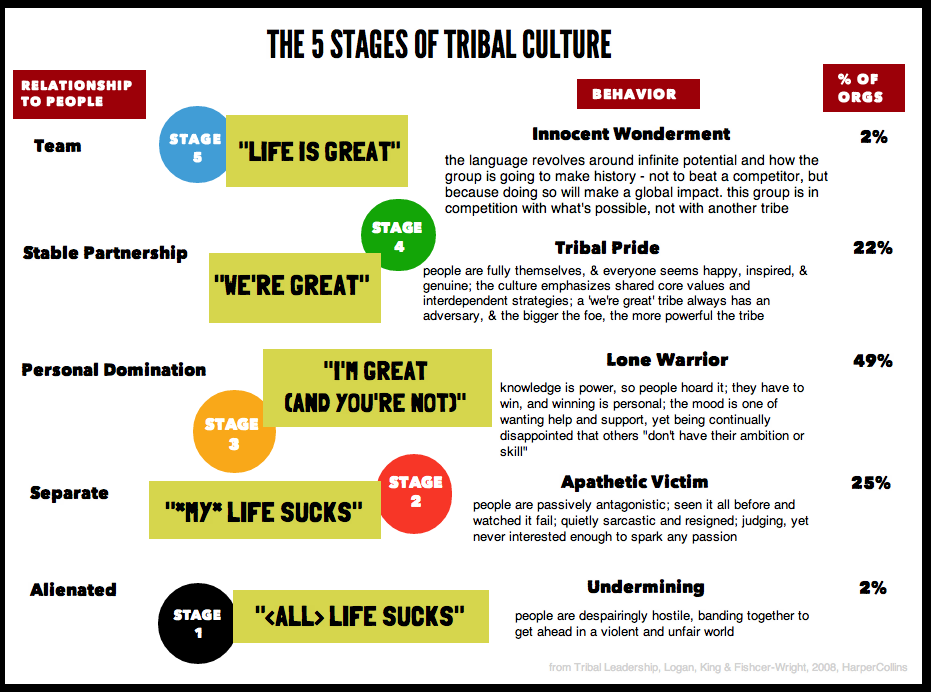
I stumbled on David Logan's "Tribal Leadership: Leveraging Natural Groups to Build a Thriving Organization" recently (available on amazon.com).  It's an interesting way to categorise stages of culture within teams/organisations and identify how to improve the culture for the mutual benefit of the tribe members. 

My quick understanding is that moving team members to a place where they invest in each other instead of looking out for themselves improves the culture of the whole tribe.

Below are some useful resources.


Quick Overview
http://emergentbydesign.com/2012/06/28/a-step-by-step-guide-to-tribal-leadership-part-1-the-five-stages-of-tribal-culture/

In-depth Book Summary
http://wiki.dsoglobal.org/t/library/tribal_leadership/summary

Cheat Sheet on how to "level up"
http://finding-marbles.com/2012/02/29/tribal-leadership-the-1-page-cheat-sheet/

TED Talk from 2009 (16min)
http://www.ted.com/talks/david_logan_on_tribal_leadership

  • Stage 3 is common among really smart people
  • Hardest thing is moving from Stage 3 to Stage 4
  • Stage 4 Example: Zappos
  • Stage 5 Example: South Africa Reconciliation Council (Desmond Tutu)
  • Distribution of Employed Tribes:
    • Stage 1: 2%
    • Stage 2: 25%
    • Stage 3: 48%
    • Stage 4: 22%
    • Stage 5: 2%
  • You need to talk all 5 tribe stages because people are at all 5 stages
  • Tribes can only hear one level above or below where they are - leaders need to nudge them up
  • Stage 3 to 4: Find someone you don't know and someone else you don't know and connect them - connect them to something greater than themselves

Monday, February 9, 2015

Nathan Marz: Suffering-Oriented Programming

Just read "Suffering-Oriented Programming" - a blog post from Nathan Marz (creator of Storm). The central idea is that you need to understand a problem well before you try to solve it properly - especially before you build generic abstractions to solve multiple use cases.  Beyond the ideas of YAGNI and MVP, the post outlines 3 distinct phases that are helpful to think about when setting out to tackle a tricky problem: 1) make it possible, 2) make it beautiful, 3) make it fast.

It has some great takeaway quotes:

  • don't build technology unless you feel the pain of not having it
  • reduce risk by ensuring that you're always working on something important 
  • ensure that you are well-versed in a problem space before attempting a large investment.
  • When encountering a problem domain with which you're unfamiliar, it's a mistake to try to build a "general" or "extensible" solution right off the bat
  • develop a "map" of the problem space as you explore it by hacking things out
  • The key to developing the "beautiful" solution is figuring out the simplest set of abstractions that solve the concrete use cases you already have. 
  • Don't try to anticipate use cases you don't actually have or else you'll end up overengineering your solution.
  • development of beautiful abstractions is similar to statistical regression: you have a set of points on a graph (your use cases) and you're looking for the simplest curve that fits those points (a set of abstractions).
  • most important... is a relentless focus on refactoring... to prevent accidental complexity from sabotaging the codebase
  • Use cases are ... worth their weight in gold. The only way to acquire use cases is through gaining experience through hacking.
  • attempts to make things generic without a deep understanding of the problem domain will lead to complexity and waste. Designs must always be driven by real, tangible use cases.

Sunday, January 18, 2015

Great AWS Tips

Came across some great AWS tips (care of Devops Weekly)

The list is below - go to this website for the full details: 

  • Application Development
    • Store no application state on your servers.

    • Store extra information in your logs.

    • If you need to interact with AWS, use the SDK for your language.

    • Have tools to view application logs.

  • Operations
    • Disable SSH access to all servers.

    • Servers are ephemeral, you don't care about them. You only care about the service as a whole.

    • Don't give servers static/elastic IPs.

    • Automate everything.

    • Everyone gets an IAM account. Never login to the master.

    • Get your alerts to become notifications.

  • Billing
    • Set up granular billing alerts.

  • Security
    • Use EC2 roles, do not give applications an IAM account.

    • Assign permissions to groups, not users.

    • Set up automated security auditing.
    • Use CloudTrail to keep an audit log.

  • S3
    • Use "-" instead of "." in bucket names for SSL.

    • Avoid filesystem mounts (FUSE, etc).

    • You don't have to use CloudFront in front of S3 (but it can help).
    • Use random strings at the start of your keys.

  • EC2/VPC
    • Use tags!
    • Use termination protection for non-auto-scaling instances. Thank me later.
    • Use a VPC.
    • Use reserved instances to save big $$$.

    • Lock down your security groups.
    • Don't keep unassociated Elastic IPs.

  • ELB
    • Terminate SSL on the load balancer.

    • Pre-warm your ELBs if you're expecting heavy traffic.

  • ElastiCache
    • Use the configuration endpoints, instead of individual node endpoints.
  • RDS
    • Set up event subscriptions for failover.

  • CloudWatch
    • Use the CLI tools.
    • Use the free metrics.
    • Use custom metrics.
    • Use detailed monitoring.
  • Auto-Scaling
    • Scale down on INSUFFICIENT_DATA as well as ALARM.

    • Use ELB health check instead of EC2 health checks.

    • Only use the availability zones (AZs) your ELB is configured for.

    • Don't use multiple scaling triggers on the same group.

  • IAM
    • Use IAM roles.
    • Users can have multiple API keys.
    • IAM users can have multi-factor authentication, use it!

  • Route53
    • Use ALIAS records.


  • Elastic MapReduce
    • Specify a directory on S3 for Hive results.

  • Miscellaneous Tips
    • Scale horizontally.
    • Your application may require changes to work on AWS.

    • Always be redundant across availability zones (AZs).

    • Be aware of AWS service limits before you deploy.

    • Decide on a naming convention early, and stick to it.

    • Decide on a key-management strategy from the start.

    • Make sure AWS is right for your workload.


Sunday, January 11, 2015

Henrik Kniberg's "Scaling Agile at Spotify"

Henrik Kniberg's done it again. He's taken a working example of complex process implementation and compressed it into a highly informative, easily-watchable and easily-readable format that makes it simple to grab the concepts and, crucially, to help show others to inspire those around you with what's possible in your IT department.

If you've read Henrik's Scrum and XP from the Trenches or Kanban vs Scrum or Lean from the Trenches, you need to see what he's been helping Spotify do with their engineering culture with scaling agile, lean, devops, culture, A/B experiments.

Two-part animated series depicting Spotify's Engineering culture

Part 1:


Part 2:


Scaling Agile at Spotify with Tribes, Squads, Chapters and Guilds


Tuesday, January 6, 2015

Little's Law

Little's Law:

Avg queue time = WIP / Throughput
Delivery rate = WIP / Lead Time
MeanResponseTime = MeanNumberInSystem / MeanThroughput

  or

Avg Inventory = Throughput * Avg queue time
Avg Customers in system = Avg arrival rate * avg customer time in system


Sunday, January 4, 2015

Experimenting with AWS EC2 Container Service

Amazon EC2 Container Service ("ecs" for short) is a Docker cluster management service that runs on top of EC2 instances.  There is no additional charge for the service - you pay for the EC2 instances whether you're using them or not.  It's early days but looks like a promising service that should take a lot of the grunt work (networking, security, etc) out of creating your own clusters like Kubernetes and Mesos.

ECS is currently in preview - I needed to wait around two weeks to be granted access after signing up here: 
https://aws.amazon.com/ecs/

This is a transcript of how I fired up a simple Docker container on ECS using Amazon instructions available on 4/Jan/2015.

Introduction

Watch this video: https://www.youtube.com/watch?v=LE5uBqNp2Ds&t=1m58s
Particularly from 1m58s to skip the Amazon propaganda and watch the interesting visualisation.

And this video has some good terminology introduction and a live demo: https://www.youtube.com/watch?v=2vJLS8qfhI0&feature=youtu.be&t=11m12s  (Slides)

Terminology:

  • Tasks: A grouping of related containers (e.g. Nginx, Rails app, MySql, Log collector)
  • Containers
  • Clusters: A grouping of container instances - a pool of resources for Tasks
  • Container Instances: An EC2 instance on which Tasks are scheduled. AMI with ecs agent installed

Setting Up

Follow these instructions:
http://docs.aws.amazon.com/AmazonECS/latest/developerguide/get-set-up-for-amazon-ecs.html

This will walk you through the setup for the following:

  • IAM User
  • IAM Role
  • Key Pair
  • VPC
  • Security Group
  • Special copy of AWS CLI that includes "ecs" commands
    • NOTE: On OS X I needed to:
      • "brew uninstall awscli" (that removed /usr/local/bin/aws from my path)
      • And add "export PATH=$PATH:~/.local/lib/aws/bin" to my .bashrc


Creating The Cluster

Follow these instructions:  http://docs.aws.amazon.com/AmazonECS/latest/developerguide/ECS_GetStarted.html

NOTE: I preferred to create the EC2 instance from the command line (instead of the Launch an Instance with the Amazon ECS AMI instructions): 
aws ec2 run-instances --image-id ami-34ddbe5c --count 1 --instance-type t2.small --subnet-id subnet-xxxxxxxx --key-name ecsdemo-keypair --iam-instance-profile Name=ecsdemo-role

... using the subnet-id for my default VPC and the "ecsdemo" keypair and IAM role name I created during the Setting Up phase above.


Then as per the instructions test it out with:

aws ecs list-container-instances

If you see
{
    "containerInstanceArns": []
}
... then something has gone wrong and you'll need to terminate your instance and try again.

To see more details about your instance:

aws ecs describe-container-instances


Running a Task (Docker process)

As per the instructions, register a Task Definition and start a Task that spins up a single docker container (based on busybox image) that simply sleeps for 6 minutes.

aws ecs register-task-definition --family sleep360 --container-definitions "[{\"environment\":[],\"name\":\"sleep\",\"image\":\"busybox\",\"cpu\":10,\"portMappings\":[],\"entryPoint\":[\"/bin/sh\"],\"memory\":10,\"command\":[\"sleep\",\"360\"],\"essential\":true}]"

aws ecs list-task-definitions
aws ecs run-task --cluster default --task-definition sleep360:1 --count 1
aws ecs list-tasks
aws ecs describe-tasks --tasks 699d5420-1d0d-410e-b105-7e51027b8fd4

Log on to your instance and check the docker container is running:

ssh -i ecsdemo-keypair.pem ec2-user@ec2-instance-public-ip

docker ps
Should see:

[ec2-user@ip-ec2-instance-public-ip-name ~]$ docker ps
CONTAINER ID        IMAGE                            COMMAND             CREATED             STATUS              PORTS                        NAMES
ec8a9fca64b0        busybox:buildroot-2014.02        "sleep 360"         3 minutes ago       Up 3 minutes                                     ecs-sleep360-1-sleep-dc8dd4cdfcf593d07d00
58e68cc5bfc3        amazon/amazon-ecs-agent:latest   "/agent"            34 minutes ago      Up 34 minutes       127.0.0.1:51678->51678/tcp   ecs-agent

See more details about your docker container with:

docker inspect ec8a9fca64b0

After 6 minutes of sleeping, the docker process should disappear from the "docker ps" listing.

More Examples

More interesting examples including Tasks that link together a number of containers are contained in the videos linked to above.


Saturday, June 28, 2014

What is DevOps Days Brisbane 2014?


I'm one of the organisers for an awesome conference coming up next month July 25-26.  It's called DevOps Days Brisbane 2014.  If you've never heard of "DevOps Days", it's an international grassroots conference run for the benefit of the IT community in cities all over the world.  For the Australian branch, formerly known as "DevOps Downunder", this is the first year it has been held in Brisbane.

We're really keen to get as many people along as we can and help put Brisbane on the international map.  We're not-for-profit - run solely for the benefit of the community so tickets are really affordable at $185 (+fees) each for a 2-day conference in the Brisbane Convention & Exhibition Centre with full food & beverage + reception drinks - crazy!  It's held over a Friday & Saturday so you or your employees need take only one day off work.

The program has just been announced with great local, national, international speakers from companies such as Chef, ThoughtWorks, RedHat, IOOF, REA & Wotif Group (including me - my first devops days talk!).  And the keynote address will be delivered by none other than world-renowned human factors and safety expert Sidney Dekker.

The format for both days is a mix of great presentations in the mornings and collaborative tech talk and problem solving in the afternoons:

  • In the mornings we have high quality single-track presentations and rapid-fire ignite talks with well respected international speakers as well as national and local thought leaders.
  • In the afternoons we have multi-tracked "openspaces" - where the content is driven by attendees for attendees - we provide advice for each other's technical and cultural problems, talk about the latest technology, and help each other think outside the square to where we want to be as an industry. It's a great format where attendees can not only receive advice from thought-leaders and peers but also bring the benefits of their perspectives to the wider community in an interactive manner.

DevOps Days conferences are inspiring, challenging, thought-provoking, and lots of fun.  Attendees walk away with new friends and a sense of camaraderie.  As well as new perspectives, not just on the latest technology, but importantly also on culture and how to collaborate, communicate and empathise with other disciplines within their own company.   DevOps is essentially an extension of Agile - bringing all the goodness of fast feedback loops (with added emphasis on collaboration and automation) to the "last mile" of deployment to production. It's not only open to developers and operations, we find that managers, architects, testers and BAs all get value out of it and contribute too.

Website with registration and full program details is here: http://www.devopsdays.org/events/2014-brisbane/

And there's still a chance to sponsor the event and get your logo alongside great international companies like PuppetLabs and AppDynamics.  Gold sponsors get 4 free tickets and Silver sponsors get 2 free tickets to send their employees or mates along.

I'm happy to come and talk in person with teams, groups, individuals around Brisbane and answer questions anyone may have.  Let me know if there's anything I can do to help you help us put Brisbane on the map!

Twitter: @mcallana
Google+: matthew.callanan
Email: matt at mattcallanan.net


Tuesday, May 6, 2014

Is TDD Dead?

An interesting read: http://david.heinemeierhansson.com/2014/tdd-is-dead-long-live-testing.html
A purposely inflammatory post that had the desired effect of bringing out some TDD heavyweight advocates on Twitter including Bob Martin and Martin Fowler....

There are some interesting points to draw from David's Twitter stream:
  • He learnt the ins-and-outs of TDD first before moving on (and he learnt a lot from it).
  • He says his view of the testing world only applies to Rails apps where tight Web + DB integration/coupling is a design choice.
  • He has very opinionated beliefs about how Rails apps should be built including
    • Rails apps should remain "small-scale"
    • ActiveRecord usage should be carefully maintained
    • ... both of which are often not the case in reality.
  • Patterns of building/testing Rails apps like Hexagon are overkill if you're building a small Rails app with business logic intended only for web audience - but can be useful if that Rails app is a peer among other interfaces.

My summary:
  • Learn TDD inside-out, learn where it fits rather than getting caught up in dogma. 
  • Know what type of app you're building
  • Then carefully design and architect your application to be testable through careful and appropriate use of unit/integration/system testing
  • Ensure your architecture is carefully and purposefully maintained.
I personally use a "Test Oriented Development" approach:

  • Exploratory coding should be done as part of a spike - normally on a "spike branch"
    • There's often not much point writing up-front tests when you need to try something you've never done before - this can be a form of waste
    • Kent Beck (the inventor of TDD) himself doesn't write tests before exploratory code - podcast
  • When you've solved the problem, jump back onto master and rewrite the solution this time with testing in mind - carefully plan Unit Tests, Component/Integration Tests, & Acceptance Tests
  • If you can't pair commit to master, push to a temporary review branch and submit a pull/merge request to a reviewer


Interesting response: https://www.destroyallsoftware.com/blog/2014/tdd-straw-men-and-rhetoric

And another one from Martin Fowler about self-testing code:  http://martinfowler.com/bliki/SelfTestingCode.html
These kinds of benefits are often talked about with respect toTestDrivenDevelopment (TDD), but it's useful to separate the concepts of TDD and self-testing code. I think of TDD as a particular practice whose benefits include producing self-testing code. It's a great way to do it, and TDD is a technique I'm a big fan of. But you can also produce self-testing code by writing tests after writing code - although you can't consider your work to be done until you have the tests (and they pass). The important point of self-testing code is that you have the tests, not how you got to them.

Monday, April 14, 2014

Ideas for Running Cucumber-JVM Selenium Tests in Parallel

Ideas on how to run Selenium-backed Cucumber tests in parallel


Use Selenium Grid 2 to coordinate the Selenium tests across a server farm of Selenium RC servers


Example Parallel Cucumber JVM execution with Maven surefire plugin forkCount

Alternatively,

Test Load Balancer


Thursday, February 27, 2014

How Etsy do Code Reviews with Continuous Delivery (incl. branching, culture)

Continuous Delivery strongly advocates developing on mainline/master/trunk.  It also advocates releasing as frequently as possible, pointing out that Continuous Deployment, where all commits that pass all the stages of the build pipeline are automatically released, is the ultimate logical extension.  But how do teams have a chance to perform code reviews if all commits to master are potential release candidates?  This question was posed on the Continuous Delivery Google Group recently, with a response from Etsy's Mike Brittain about how they do it.  TL;DR: It involves temporary short-lived branches for reviews and a culture: of keeping changes small, not deploying without review & being good at assessing risk of releasing untested code.


  • Are code reviews mandatory?  Any formal process or tool that "gates" check-ins to trunk, based on peer review?
    • Code review is not mandatory, nor does it gate check-ins to trunk or deployments to production. 
    • Some of the hangups we have about gating deploys in this fashion is that gating artificially slows us down emergencies/outages, and as Jez put it in the topic you linked to, gating assumes stupidity that has to be corrected for. 
    • We have built the culture in our Engineering team to assume everyone is going to do the right thing, and we should trust them. When that trust falls apart, I think of it as a bug in our hiring and on boarding processes.
    • It is socially unacceptable at Etsy to deploy without some form of review, and that's true for nearly every sub-team. 
    • Many of our reviews happen in GitHub (Enterprise), and so have an audit trail attached to them of who reviewed and what was discussed. 
    • Other code reviews might be a simple copy-and-paste of a patch file, or an over the shoulder review by a peer. 
    • Most changes are relatively small and can be easily grokked
  • With respect to config flags (feature switches) and other *new* code:
    • It's possible that we'll deploy code to our production servers that is not live (e.g. "dark code"), but that a more formal code review will happen later when all of the changes for some new feature or product are complete. 
    • Maybe this is just a side effect that we don't use feature branches, and that we think of committing to git as deploying to web servers (they happen nearly in sync). 
    • That doesn't mean that the code will be live to a public user. (Think: new class files, or new and unlinked JS or CSS, features that are gated off so that they are only available to staff members).
  • Likely that any change which would negatively impact customers in the short-term will be caught by automated tests?
    • I'd argue that there are a number of changes that could negatively impact consumers or, more to the point, their behavior, that would never be caught by automated tests. 
    • These are the types of things you might think of for classic A/B tests—size, shape, position, color of UI elements, feature discoverability, fall-off in multi-page flows. 
    • And that is why we move quickly to get these changes to the (A/B) testing phase.
    • This statement seems to imply that automated tests are the only way to catch bugs. We find a lot of bugs through production monitoring that we would have never conceived of writing tests for.
  • We have the benefit of operating our own products - not dealing with contractual obligations to deliver "bug-free" code to clients. 
    • We're deeply immersed in the trade-offs of testing vs. speed, and I think that's well understood by many engineers on the team who are making decisions around those trade-offs every day. 
    • We regularly make mistakes at this, identify the mistakes through open discussion, and those engineers who were involved come away more experienced and wiser for it.
  • Assumption of "under-reviewed code"?
    • Many cases where we deploy code, even publicly, that you would consider to be "under-reviewed"
    • The relative degree of testing that we apply is proportional to the amount of risk involved. 
    • We are decent at assessing and socializing risk :) 
    • Our Payments team, for example, is much more rigid about their review process than teams that, say, are running experiments at the UI level. 
    • It's not one-size-fits-all.
  • You mentioned that you don't use feature branches, but also mentioned that most of your reviews are done in Github Enterprise?
    • What you're pointing out is some subtlety around how we refer to branches and reviews.
    • In terms of development process, we don't use feature branches in the traditional sense—especially if you think of branches existing for more than a day. 
    • In practice, there are certainly cases where individuals will use a short-lived branch to isolate a couple of things they're working on at a time, much like you might use git stash—such as to switch context to work on an immediate bug fix that needs to go to production.
    • Our review process does utilize branches but only to support the review process. 
    • As an engineer prepares to commit a change set, they create a (short-lived) review branch in git. 
    • This allows us to look at the review in GitHub Enterprise and use their commenting and visual diff'ing. 
    • It also allows other engineers to checkout the branch and put it through its paces, when necessary.
    • Once the code review is complete, the branch is typically auto-merged in GitHub when the engineer is prepared to deploy it.
    • Yes, it's a subtle (and perhaps stubborn) distinction. :)
    • It seems that "time to review" would be a fairly key metric in that case
      • This is true, but it's not really a problem. 
      • Daily stand-ups generally work for socializing if you're blocked on someone's feedback on a code review
  • For your review process, would you say you're using a variant of what GitHub calls "GitHub Flow"?  
    • http://scottchacon.com/2011/08/31/github-flow.html - (as distinct from what Scott calls the overly "complicated" gitflow model).  
    • Perhaps tweaking step #2 to happen after making local changes to 'master' on an as-needed basis
      • That's pretty much right. We only go onto a branch for the review stage. 
  • How do you ensure branches (whether for bugfixes or reviews) remain short-lived? 
    • It's a cultural thing. 
    • You learn that practice in the first days of work on the engineering team. 
    • If you get into a review where you've got a boatload of code that's difficult to understand or to assess the risk, your peers will point that out.
    • This is also the reason we don't advocate new work to start immediately on a feature branch - those have a tendency to allow code to build up, especially in local branches.
    • Small, frequent changes to master by our engineers probably cause a greater frequency of bumping into each other, but at the same time help avoid large-scale merge conflicts.
    • Scott lays out that remote branch tracking (in GitHub and "git pull") is excellent for monitoring what people are working on. 
      • We get the same through commit logs to master and high visibility into the state of master (i.e. what's in production). 
      • I'm not going to suggest that one is inherently better than the other. 
      • Both of us have models that have worked well within our own teams.

Tuesday, December 31, 2013

How to build Netflix RSS Reader Example on Centos 6 with Amazon AWS

Instructions for installing Netflix RSS Reader on Amazon EC2

In the last week of December 2013, I built and installed the Netflix example RSS Reader application through following these instructions on the Netflix recipes-rss wiki.  See also the Netflix Tech Blog for an overview.

There were a lot of dead ends and rabbit warrens involved in this process as there are a lot of components to get up and running, including: infrastructure, networking, JDK, Gradle, source code, Tomcat, Jetty.

Hopefully these step-by-step instructions make it easier for someone.

It's worth noting a couple of default assumptions that aren't immediately clear that do actually make your life easier:
  1. All 3 services (Eureka, RSS Middletier, RSS Edge) are installed on the same host - you don't need to create 3 separate machines and network them all together
  2. The RSS Reader example does not require Cassandra but uses in-memory data storage by default (connecting to Cassandra is optional)
The first set of instructions below are how to get it running on a single instance.  The follow-on instructions describe how to scale it out to separate clusters of nodes - which is where Turbine/Hystrix gets interesting.

On to the instructions...

Basic Single-Instance Installation


# Instructions prefixed with "###" are dead-ends I went down - may save you time to skip them.

# Create the machine

# Create an EC2 Instance in the AWS console with the following:
#   AMI base image: Centos 6 x86_64 with updates
#   Instance: m1.small (WARNING: t1.micro's 600M RAM is insufficient)
#   Create a security group and save the key. Login to your new instance as root with the downloaded key.


# Setup the networking configuration to allow the services to talk to each other and allow you to browse to them:

# Configure AWS security Group: 
#   Open TCP Input ports: 22, 80, 9090, 9092, 9191, 9192
#   Ideally but optionally expose them only to your IP address instead of the whole world (0.0.0.0/0)

# Configure iptables:
# Flush all existing rules
iptables -F
# Block null recon packets
iptables -A INPUT -p tcp --tcp-flags ALL NONE -j DROP
# Reject syn-flood attack
iptables -A INPUT -p tcp ! --syn -m state --state NEW -j DROP
# Allow loopback for internal services
iptables -A INPUT -i lo -j ACCEPT
# Open ports 22 (ssh) & 80 (http)
iptables -A INPUT -p tcp -m tcp --dport 22 -j ACCEPT
iptables -A INPUT -p tcp -m tcp --dport 80 -j ACCEPT
# Open ports 9090 & 9092 for RSS Reader Edge webserver
iptables -A INPUT -p tcp -m tcp --dport 9090 -j ACCEPT
iptables -A INPUT -p tcp -m tcp --dport 9092 -j ACCEPT
# Open ports 9191 for RSS Reader Middletier webserver
iptables -A INPUT -p tcp -m tcp --dport 9191 -j ACCEPT
iptables -A INPUT -p tcp -m tcp --dport 9192 -j ACCEPT
# Allow outgoing connections
iptables -I INPUT -m state --state ESTABLISHED,RELATED -j ACCEPT
# Allow all outgoing connections
iptables -P OUTPUT ACCEPT
# Drop everything else
iptables -P INPUT DROP

iptables -L -n
service iptables save
service iptables restart

# For better security, consider leaving port 80 closed and forwarding requests on port 80 to port 8080. Then, in the Tomcat instructions below, we could leave Tomcat on the default 8080 port without requiring "root" user

# iptables -A PREROUTING -t nat -i eth1 -p tcp --dport 80 -j REDIRECT --to-port 8080
# iptables -A INPUT -p tcp -m tcp --dport 8080 -j ACCEPT


# Install JDK

### I shouldn't have done this first step... it only installs the JRE... Gradle needs the JDK
### yum install -y java-1.7.0-openjdk.x86_64

# Install Oracle JDK as per: http://parijatmishra.wordpress.com/2013/03/09/oraclesun-jdk-on-ec2-amazon-linux/
### Remove OpenJDK. Hopefully not required if you didn't do the above "yum install java-1.7.0-openjdk.x86_64"
### rpm --erase --nodeps java-1.7.0-openjdk java-1.7.0-openjdk-devel
yum install -y wget
# There's probably a better way to get the most recent JDK - but these instructions made it easy
wget --no-check-certificate --no-cookies --header "Cookie: gpw_e24=http%3A%2F%2Fwww.oracle.com%2Ftechnetwork%2Fjava%2Fjavase%2Fdownloads%2Fjdk-7u3-download-1501626.html;" http://download.oracle.com/otn-pub/java/jdk/7u25-b15/jdk-7u25-linux-x64.rpm
mv jdk-7u25-linux-x64.rpm\?AuthParam\=1388300280_9fd087722658cfbb8e571f2d0449beea jdk-7u25-linux-x64.rpm
yum install -y jdk-7u25-linux-x64.rpm 

for i in /usr/java/jdk1.7.0_25/bin/* ; do \
 f=$(basename $i); echo $f; \
 sudo alternatives --install /usr/bin/$f $f $i 20000 ; \
 sudo update-alternatives --config $f ; \
done

cd /etc/alternatives
ln -sfn /usr/java/jdk1.7.0_25 java_sdk
cd /usr/lib/jvm
ln -sfn /usr/java/jdk1.7.0_25/jre jre
# JAVA_HOME must be set for Gradle to work
echo "export JAVA_HOME=/usr/java/jdk1.7.0_25" >> .bashrc
. ~/.bashrc


### Install Gradle - may not be required as the Netflix build steps below use self-contained "gradlew" script (which downloads Gradle)
### curl -O "http://downloads.gradle.org/distributions/gradle-1.10-all.zip"
### yum install -y unzip
### cd /opt
### unzip ~/gradle-1.10-bin.zip 
### cd
### echo "export PATH=$PATH:/opt/gradle-1.10/bin" >> .bashrc
### . ~/.bashrc 


# Build RSS Reader Middletier and Edge webapps

yum install -y git

git clone https://github.com/Netflix/recipes-rss.git
cd recipes-rss
./gradlew clean build

### This was required to fix error "Error compiling file: /tmp//org/apache/jsp/jsp/rss_jsp.java org.apache.jasper.JasperException: PWC6033: Unable to compile class for JSP"
### javac /tmp/org/apache/jsp/jsp/rss_jsp.java -cp /root/recipes-rss/rss-edge/build/libs/rss-edge-0.1.0-SNAPSHOT.jar:/tmp -source 1.5 -target 1.5

# Install Tomcat 6 (didn't bother with Tomcat 7 as it wasn't available in defuault Centos 6 yum repo, as per "yum search tomcat")
yum install -y tomcat6
sed -i 's/port=\"8080\"/port=\"80\"/g' /etc/tomcat6/server.xml
# Set TOMCAT_USER to "root"
vim /etc/tomcat6/tomcat6.conf
    # Replace TOMCAT_USER setting with:
    TOMCAT_USER="root"
# End of edit
cd
echo "export TOMCAT_HOME=/usr/share/tomcat6" >> .bashrc
. ~/.bashrc

# Build and deploy Eureka
git clone https://github.com/Netflix/eureka.git
cd eureka/
./gradlew clean build
cp ./eureka-server/build/libs/eureka-server-XXX-SNAPSHOT.war $TOMCAT_HOME/webapps/eureka.war

service tomcat6 start

# Make sure there are no errors
grep "ERROR" /usr/share/tomcat6/logs/catalina.out | less -S

# (takes around 2mins to startup, expect some startup errors due to Eureka not running in an established cluster)
# Browse to http://[IP ADDRESS]/eureka/   <-- trailing slash required


# In another terminal session
# Start RSS Middletier Webserver
export APP_ENV=dev
cd recipes-rss
java -Xmx128m -XX:MaxPermSize=32m -jar rss-middletier/build/libs/rss-middletier-*SNAPSHOT.jar

# Test via Admin port: Browse to: http://[IP ADDRESS]:9192


# In another terminal session
# Start RSS Edge Webserver
export APP_ENV=dev
cd recipes-rss
java -Xmx128m -XX:MaxPermSize=32m -jar rss-edge/build/libs/rss-edge-*SNAPSHOT.jar

# Test via Admin port: Browse to: http://[IP ADDRESS]:9092
# Browse to http://[IP ADDRESS]:9090/jsp/rss.jsp
# Add the following RSS feeds:
# http://rss.cnn.com/rss/edition.rss
# http://feeds.washingtonpost.com/rss/politics
# http://news.yahoo.com/rss/us
# http://rss.cnn.com/rss/money_autos.rss


# Optional Extras...


# Install Hystrix: https://github.com/Netflix/recipes-rss/wiki/Hystrix-Metrics-%28Optional%29

# Open port 7979 in AWS Security Group

iptables -A INPUT -p tcp -m tcp --dport 7979 -j ACCEPT
iptables -L -n
service iptables save
service iptables restart

git clone https://github.com/Netflix/Hystrix.git
cd Hystrix/hystrix-dashboard
../gradlew jettyRun

# Browse to: http://[IP ADDRESS]:7979/hystrix-dashboard
# Enter http://[IP ADDRESS]:9090/hystrix.stream to see the Hystrix metrics show up in the dashboard. You will have to send a few transactions from the Edge service to have the Hystrix metrics loaded.

# Stress the Edge webserver and watch the circuit trip into "Open" state:
for i in {1..100}; do curl -s -o /dev/null -w "%{http_code} %{url_effective}\\n" "http://[IP ADDRESS]:9090/jsp/rss.jsp" & done


# Hystrix Example application: https://github.com/Netflix/Hystrix/tree/master/hystrix-examples-webapp

# Open port 8989 in AWS Security Group

iptables -A INPUT -p tcp -m tcp --dport 8989 -j ACCEPT
iptables -L -n
service iptables save
service iptables restart

cd Hystrix/hystrix-examples-webapp
../gradlew jettyRun

# Browse to: http://[IP ADDRESS]:8989/hystrix-examples-webapp

# View it on Hystrix dashboard
# Browse to: http://[IP_ADDRESS]:7979/hystrix-dashboard/
# Enter: http://[IP_ADDRESS]:8989/hystrix-examples-webapp/hystrix.stream
# Click "Monitor Stream"

# See the metrics change with this in one window:
curl [IP_ADDRESS]:8989/hystrix-examples-webapp/hystrix.stream
# And this in another window:
while true ; do curl "[IP_ADDRESS]:8989/hystrix-examples-webapp/"; done   # <-- The trailing "/" is required


# Install Turbine: https://github.com/Netflix/Hystrix/wiki/Dashboard
curl -L -O https://github.com/downloads/Netflix/Turbine/turbine-web-1.0.0.war
cp turbine-web-1.0.0.war $TOMCAT_HOME/webapps/turbine.war

# Configure Turbine (using Archaius)
vi /root/rss-edge-turbine.properties
    # From https://github.com/Netflix/Hystrix/wiki/Dashboard
    # Hystrix stream for RSS Edge webapp
    turbine.ConfigPropertyBasedDiscovery.default.instances=localhost
    turbine.instanceUrlSuffix=:9090/hystrix.stream
# End edit

# Add Archaius config to Tomcat "archaius.configurationSource.additionalUrls"
vi /etc/tomcat6/tomcat6.conf
    # Archaius properties for Turbine and Netflix
    JAVA_OPTS="${JAVA_OPTS} -Darchaius.configurationSource.additionalUrls=file:///root/rss-edge-turbine.properties"
# End edit


service tomcat6 restart
# Should see this in the logs: "URLs to be used as dynamic configuration source: [file:/root/rss-edge-turbine.properties]"
grep rss-edge /usr/share/tomcat6/logs/catalina.out

# Browse to: http://[IP_ADDRESS]:7979/hystrix-dashboard/
# Enter: http://54.206.19.137/turbine/turbine.stream
# Click "Monitor Stream"


# Install hystrix-dashboard in Tomcat
curl -O http://search.maven.org/remotecontent?filepath=com/netflix/hystrix/hystrix-dashboard/1.3.8/hystrix-dashboard-1.3.8.war

# Install hystrix-examples-webapp in Tomcat
cd Hystrix/hystrix-examples-webapp
../gradlew build
cp build/libs/hystrix-examples-webapp-1.3.9-SNAPSHOT.war /usr/share/tomcat6/webapps/hystrix-examples-webapp.war

Cluster Install

Turbine really only starts to shine once there are clusters involved.

Let's set up a cluster of dedicated Edge and Middletier instances, a dedicated Eureka instance (on Tomcat together with Hystrix Dashboard + Turbine) and with ELB in front of the Edge cluster. Something like this:

         Internet                           Internet
             |                                  |
 ------------|----------------------------------|---------------------------------------------
             |                                  v
             |                               AWS ELB
             |                                  |
  /----------|------------------------\        /|\
  |          v                        |        v v v
  | Hystrix Dashboard  <-- Turbine  <-----  RSS Edge (x3) 
  |                                   |    ^  ^ ^ ^
  |                                   |   /    \|/
  |                       Eureka <--------      |
  |                          ^        |         |
  \--------------------------|--------/        /|\
                             |                v v v
                             ---------- RSS Middletier (x3)


# To make things easier, before we scale out we'll set up some convenience 
# hostnames and scripts - in reality we'd come back and automate this 
# properly later on with Puppet/Chef/Ansible/Salt/Baked-into-image

# Add an entry with the Private IP address of the server in /etc/hosts e.g.:
127.0.0.1       eureka

vim "recipes-rss/rss-edge/src/main/resources/edge.properties"
    eureka.serviceUrl.default=http://eureka/eureka/v2/
# End edit

vim "recipes-rss/rss-middletier/src/main/resources/middletier.properties"
    eureka.serviceUrl.default=http://eureka/eureka/v2/
# End edit

# Rebuild both jars
cd /root/recipes-rss && gradlew build

# Create the following scripts in root's homedir:

# change_eureka_host.sh
#!/bin/bash
if [ $# -lt 1 ]; then
    echo "Usage: $0 IP_ADDRESS"
fi
sed -i "s/.*eureka/$1    eureka/g" /etc/hosts

# start_rss-edge.sh
#!/bin/bash
cd /root/recipes-rss
nohup java -Xmx128m -XX:MaxPermSize=32m -jar rss-edge/build/libs/rss-edge-*SNAPSHOT.jar &
echo "Output is logged to /root/recipes-rss/logs/rss-edge.log"

# start_rss-middletier.sh
#!/bin/bash
cd /root/recipes-rss
nohup java -Xmx128m -XX:MaxPermSize=32m -jar rss-middletier/build/libs/rss-middletier-*SNAPSHOT.jar &
echo "Output is logged to /root/recipes-rss/logs/rss-middletier.log"


# tail_rss-edge.sh
#!/bin/bash
tail -100f /root/recipes-rss/logs/rss-edge.log

# tail_rss-middletier.sh
#!/bin/bash
tail -100f /root/recipes-rss/logs/rss-middletier.log


# Save the instance as an AMI
# Now create 6 more instances based off this AMI - they can all be t1.micro's (in fact we can reprovision our main node as a t1.micro and only run Tomcat on it for Eureka, Hystrix Dashboard, & Turbine)
# Optional: Name them in the EC2 console as rss-edge-N, rss-middletier-N, rss-eureka
# Create 2 more security groups: rss-edge & rss-middletier
# Ensure 'rss-edge' security group has ports 9090 & 9092 open
# Ensure 'rss-middletier' security group has ports 9191 & 9192 open
# Create a Load Balancer named 'RssEdgeLoadBalancer' containing all 3 
# rss-edge-* nodes.  Attach ports 9090 & 9092 to the same ports.
# Optional: add a health check on:
#   Protocol: HTTP
#   Port: 9092
#   Path: /adminres/webadmin/index.html
#   Timeout: 5s
#   Interval: 0.5min
#   Unhealthy Threshold: 2
# Optional: Add cloudwatch alarm in Monitoring tab
#   UnHealthyHostCount >= 1 for 1 minute
#   Send message to topic "NotifyMe"

# On the Eureka node add the Private IP addresses of the nodes to /etc/hosts 
# e.g.:
127.0.0.1       eureka
172.31.111.333  rss-edge-1
172.31.111.444  rss-edge-2
172.31.111.555  rss-edge-3
172.31.111.666  rss-middletier-1
172.31.111.777  rss-middletier-2
172.31.111.888  rss-middletier-3

# On the Eureka node - modify the all-turbine.properties
vi /root/all-turbine.properties
    turbine.ConfigPropertyBasedDiscovery.rss-edge.instances=rss-edge-1,rss-edge-2,rss-edge-3
# End edit


# Create a script to load test the Edge nodes

# hammer_rss_vip.sh
#!/bin/bash

# Usage: hammer_rss_vip.sh [pause_seconds] 
#   e.g. hammer_rss_vip.sh 0.1   - will pause for 100ms between requests
#   e.g. hammer_rss_vip.sh       - no pause: fire requests as fast as we can fork processes in the background

RSS_EDGE_VIP=rssedgeloadbalancer-NNNNNNNNNN.xx-region-N.elb.amazonaws.com
DELAY=${1-0}

while true ; do
  curl -s -o /dev/null http://$RSS_EDGE_VIP:9090/jsp/rss.jsp &
  sleep $DELAY
done

# Now watch Turbine via the Hystrix Dashboard while you load test the Edge via the ELB and see the difference for different timings
hammer_rss_vip 1
hammer_rss_vip 0.1